Every display gets its own settings, plus a text-only LED board
A long weekend of work since hiding the market price. The biggest change is how you set up your displays, so I'll start there.
Every display gets its own settings
Until now, some settings covered every display at once and some were per display, and they lived in two places. Show mode, page timing, brightness, and night hours were under Wall settings on the Wall tab and applied to everything. What each display shows and its card pictures were on the Account tab, one row per display.
That didn’t make sense for people with multiple screens. I wanted the show board selling and the TV at home still showing my collection, and I couldn't have both.
So now every setting belongs to the display it's on:
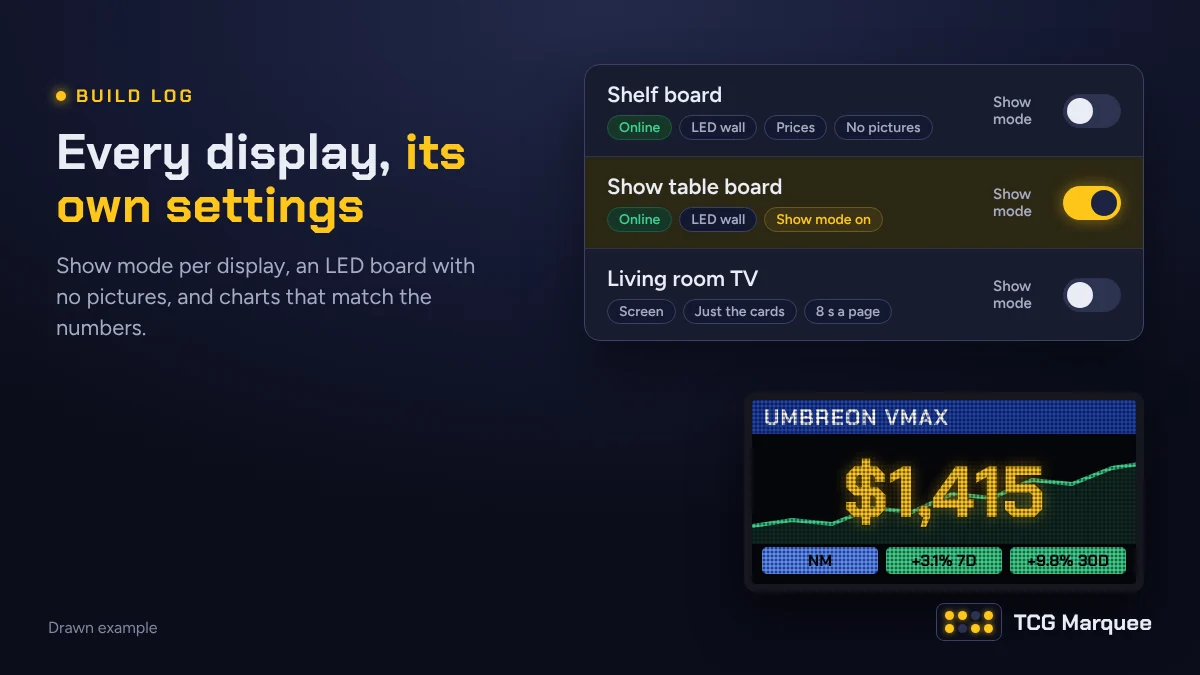
- Your displays is a list on the Wall tab, right under the preview. Each row shows what that display is doing: online or not, prices or just the cards, show mode, card pictures, and how many seconds each page stays up.
- Show mode has a switch on every row. Flip it for the board at your table and leave the TV at home alone.
- Tap a display to open its settings: name, prices or just the cards (and which binders), card pictures, show mode, hiding the market price, the shop page, seconds per page, the ticker, brightness, night hours, and firmware updates. TVs only show the settings a TV can use.
- Apply to all displays copies the settings you pick from one display to the others. Set up one board the way you like it, then copy its timing and brightness everywhere in one go. Settings that only make sense on an LED board skip the TVs.
- A new display starts with the same settings as your first one, with show mode off.
Nothing changed on anyone's wall when this went out. Every display started with the settings your account already had, so it shows exactly what it showed before until you change something.
A few things moved to the Account tab, because they belong to you and not to one display: your shop name, logo, and QR code link (one shop page for the whole account), your time zone, and price alert emails.
The preview
The preview at the top of the Wall tab has a new picker, Show the preview as. Pick one of your displays and the preview draws the wall exactly the way that display shows it: its card pictures, its show mode, its binders. Screen mode and Share follow along.
Or pick This browser, and the switches under it change only what you see on this device: Show mode here (for a laptop or tablet at your table), Just the cards, and Card pictures (preview only), which lets you try each picture style without changing a board.
An LED board with no pictures
Card art on a 128 by 64 panel is still the weak spot. While I keep working on it, there's a fourth Card pictures choice for boards: No pictures (text only). It leaves the art off and uses the whole panel for the card:
- the name on a blue bar across the top
- the price as big as it fits, in the TCG Marquee font
- the set, card number, and copies under it
- a row of chips: condition or grade, then the 7 and 30 day changes in green or red
And behind the price, the card's last 30 days as a chart, edge to edge, green if it went up and red if it went down. It needs at least 3 days of prices, so a brand new card shows without one. Show mode and Just the cards pages don't get a chart. I didn't think a vendor would want a falling line next to an asking price, but tell me if you would.
Open a board's settings to switch it, or pick it under Card pictures in the preview to see it first.
Charts that match the numbers
Running the Showcase on my board, I saw a raw Umbreon VMAX show up twice in a row with the same price and the same 7 and 30 day changes, one chart red and one green. A chart that argues with the numbers next to it is worse than no chart.
Two things were going on. The changes come from Scrydex for that exact version of the card, but the chart was built from the day you added your copy, so two copies added on different days drew different lines. And a card switched from graded to raw could keep its old grade in the background and count as a second version.
Now every chart comes from the price history of the version itself (same printing, same condition or same grader and grade), from Scrydex plus each day's price. Every copy of that version draws the same line. Before a chart shows, it's checked against the 7 and 30 day changes beside it. If they don't agree, the chart stays hidden (and the card in your collection says why) instead of showing you something wrong. The text-only board and the price chart on each card both use it.
The nice side effect: a card you add today shows up to 90 days of history right away, instead of starting empty and filling in day by day. Sealed product still builds its chart from our own daily prices, because Scrydex doesn't keep history for sealed.
Firmware updates you control
LED boards update themselves when there's new firmware, which is great until one restarts in the middle of a sale. Each board now has a choice under Firmware updates:
- Automatic (the default): it updates within a minute, except while that board's show mode is on. It waits until you turn show mode off.
- Ask before updating: it waits for you to press Install now.
When an update is waiting, the board's row says so, and Install now is in its settings. The board restarts for about a minute.
A steadier server
One evening the server's internet lookups broke for a few hours, and while they were down, every card picture the server hadn't saved yet made the whole site wait. The board kept giving up and starting over. Now the server downloads a board's pictures side by side, remembers a picture that failed for 10 minutes instead of trying it again on every page, and draws pages without holding up everything else. In a test with the same kind of outage, a batch of board pages went from about 12 seconds to about 3 the first time and a tenth of a second after that, and the site kept answering the whole time.
Want in?
The open beta still has tester spots. Claim one, set up a display or two, and tell me what you'd change next.