Hide the market price, bolder card art, and Fire TV
A few days of work since sealed product landed, and the first one came straight from a user. Here's everything that changed.
Hide the market price in show mode
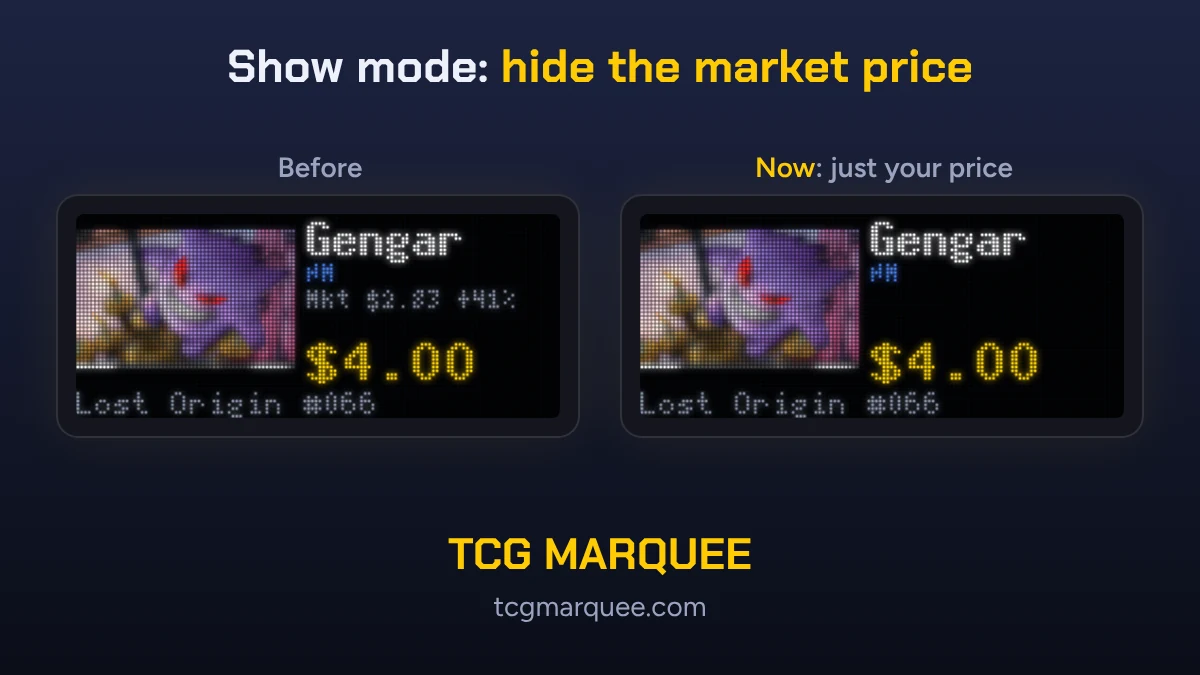
Show mode puts your asking price up big, with the market price and how far you are over or under it on a line underneath. That's great when you're priced under market. It's not so great when you're asking $4 for a card that books at $2.83 and the screen says "+41%" right under it.
So now you can turn that line off:
- One card: open the card and tick Hide the market price in show mode, right under the asking price.
- A stack of cards: select them in your collection, tap Market price... in the bar at the bottom, and choose Hide it (or Show it to put it back).
- Everything: in Wall settings, tick Show mode: never show the market price next to an asking price.
Buyers see your card, your price, and nothing else. It works on the LED board, screen mode, and the TV apps, with no update needed on any of them. Your own collection list still shows the market price and marks those cards "market hidden" so you know which ones they are.
One thing to know: it only matters for cards with an asking price. If you leave the asking price blank, the card sells at market and that number is the price on the screen.
Card art on the LED board
When I put real cards on the panel for the first time, the pictures were the weak spot. Two problems:
Washed out color. Card pictures on the board now get a little more color and contrast. Only the board gets this (and the wall preview, when you pick a close-up option there); screen mode and the TV apps are unchanged. I didn't add a brightness curve on top, because the panel's driver already applies one and doing it twice crushes the dark parts of the art.
Tiny Pokemon. A whole card shrunk to 128 by 64 LEDs leaves the Pokemon at about 40 by 25 dots, and half the picture is attack text. So for regular Pokemon cards (common through rare holo), the board now shows just the artwork window. Full arts, illustration rares, ex, V, promos, and other games keep the whole card, because on those the Pokemon can be anywhere on it.
That needed a new layout: the picture on the left, the name, condition, 7 and 30 day changes, and price on the right, and the set and card number across the bottom. Show mode pages use the same layout now, and whole-card pages show the card number too.
Close-up, bold. Then I tried a bigger version: the artwork 58 LEDs wide instead of 43, with busy backgrounds softened and darkened so the Pokemon's shape stands out. I've been running it on my panel and I like it a lot.
Each board can be set to Whole card, Close-up, or Close-up, bold (test) under Account, Walls and screens, and the Card pictures picker on the Wall tab lets you preview all three before you switch. Close-up stays the default for now. I'm going to ask people at shows which one they like best and go with that.
Full names for sealed product
The board used to shorten sealed names to fit, so "30th Celebration Binder Collection" showed up as just "Binder Collection." Now screen mode and the TV apps always show the full name, and the board uses the full name whenever it fits, falling back to the short one only when it doesn't.
A ticker fix for the board
After a day of switching between prices and collection mode, the price ticker on my board would sometimes go missing. The board was finding room for the ticker in whatever memory was left over, and after enough switches there wasn't a big enough piece. Firmware 0.2.13 sets that memory aside when the board starts, and if the ticker ever does fail to load, the board tries again every 2 minutes instead of waiting for your cards to change. It's running on my board now.
The newest Fire TV sticks
When I wrote that TCG Marquee is coming to Fire TV, I was planning on one Android app for everything. It turns out Amazon's newest sticks don't run Android anymore. The Fire TV Stick 4K Select, the Fire TV Stick HD (2026), and the Fire TV Stick 4K (3rd Gen) run Amazon's new Vega OS, which needs its own app. The 4K Max and 4K Plus still run Fire OS and get the Android app.
So I wrote a second app for Vega. It's running in Amazon's Vega Virtual Device, and it looks really nice. Next up is the real 4K Select stick.
One catch I'm still working on: from what Amazon has said on its developer forums, Vega doesn't yet let an app like this keep the screensaver away, the way the Android and Apple TV apps keep the screen on. For a price wall that's supposed to stay up all day, that matters, so I'll share what I find.
Want in?
The open beta still has tester spots. Claim one, and tell me what you'd change next.