Sealed product is here: packs, boxes, and ETBs on your wall
Until today, TCG Marquee only knew about single cards. That booster box in the closet, the Elite Trainer Box you never opened, the case you're sitting on until it climbs: none of it counted. Now it does.
What you can add
Scrydex, where TCG Marquee gets its prices, keeps a list of sealed product with market prices. The site now downloads that whole list and refreshes it once a day. Today that's a little over 3,000 products:
- Pokemon, English and Japanese (Japanese product is priced in dollars, like everything else)
- One Piece
- Lorcana
- Riftbound
- Magic, only a handful of the newest sets for now, because that's all Scrydex lists so far
Gundam has no sealed list yet, so it's hidden until one shows up.
It covers the kinds of product people actually hold: booster packs, booster boxes and displays, Elite Trainer Boxes, bundles, cases, tins, collection boxes, starter decks, blisters, and Build & Battle kits.
How to add it
- Open Collection, then Add a card, and flip the switch to Sealed product.
- Pick the game and type part of the name, like
151 bundle. Results show as you type. - Narrow it down by kind (packs, boxes, ETBs, and so on). For Pokemon you can also show only English or only Japanese product.
- Some products come in more than one version, like a 1st Edition or a Pokemon Center Elite Trainer Box. Pick the one you have. Each has its own price.
- Press Add, then set the quantity, what you paid, and the binder.
The app remembers which switch you used last, so if you're entering a pile of sealed, it stays on Sealed product. Spreadsheet import and export handle sealed rows too.
Every plan can add sealed. On the Collector plan, sealed products and cards count together toward the 250 limit.
On the wall
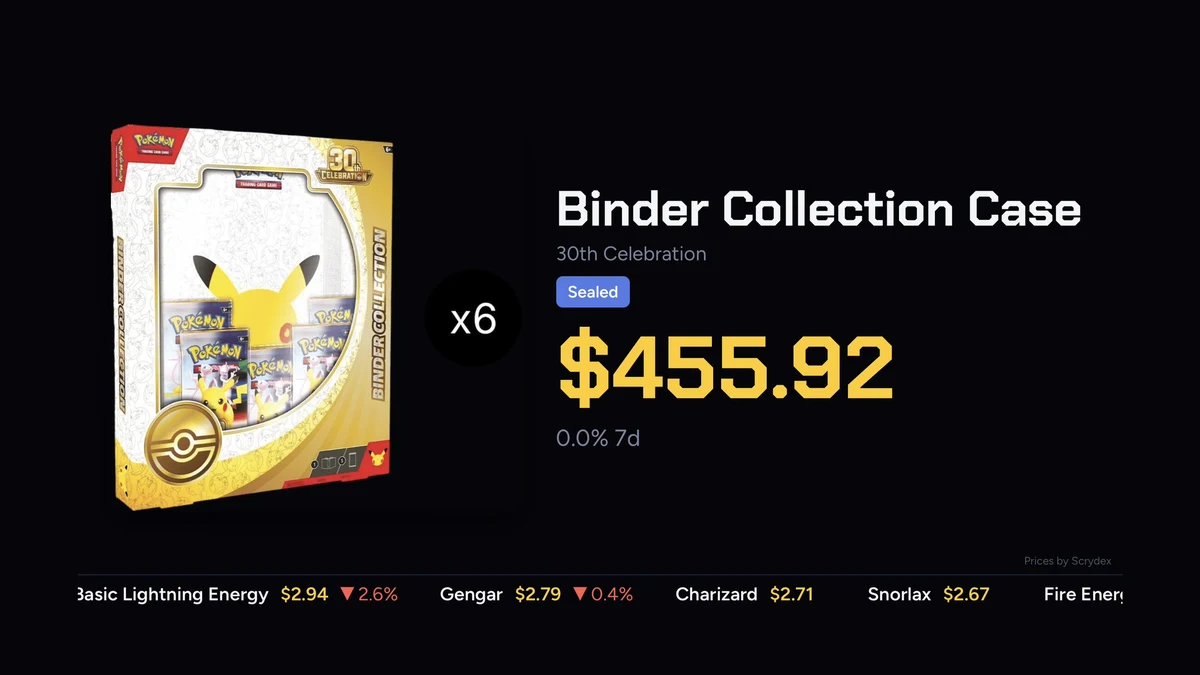
Sealed product shows up everywhere your cards do: the LED board, screen mode, and the Apple TV app. You get the product picture, the market price, and the 7 and 30 day change, marked Sealed (or the version, like 1st Edition, when it matters). It adds to your collection's value.
Names are shortened on the wall so they fit. "Mega Evolution Elite Trainer Box" shows as "Elite Trainer Box" with the set on the line under it. Your collection list keeps the full name.
For vendors
Sealed is a big part of most show tables, and leaving it out was the most obvious gap. Now sealed you mark for sale works in show mode: your asking price big, the market price under it.
The Shopify sync, still a work in progress, used to skip sealed listings. Now it matches them to the sealed list. It only matches on its own when exactly one product fits the title, so "151 Booster Box" never gets mixed up with the case. When more than one could fit, it asks you which one it is. It never guesses.
A few honest notes
- Prices update once a day. A brand new product can show up before it has a price. It fills in once it starts selling.
- Older vintage product doesn't trade often. Its price can sit still for a long time because there just aren't many sales. Treat those numbers as a rough guide.
- The price chart starts the day you add it. Scrydex doesn't keep price history for sealed, so the chart fills in day by day from then on.
- On TV, boxes sit in card-shaped frames for now. It works, but a layout made for sealed product is on my list.
If you're a beta tester, it's live now: go add that ETB. If you're not in yet, request an invite.